VidSeeds.ai Review - Pre-Upload Review Tool That Tells You What to Fix Before You Publish
The Video You Can't Quite Ship (And How VidSeeds.ai Fixes It)
Here's a statistic nobody tracks: how many good videos get published with a flaw the creator never saw coming.
YouTube's algorithm surfaces content. But discovery platforms (Reddit, Twitter, email newsletters, WhatsApp forwards) and the all-important first 30 seconds respond to something harder to measure: whether the video actually lands. A video can be technically excellent and algorithmically discoverable yet underperform because the hook is soft, the pacing drags, or the title earns a click and then a bounce.
This gap (between a finished video and a video that's actually ready to ship) is where most creators lose audience.
VidSeeds.ai enters this gap from an unexpected angle. It doesn't help you find keywords or predict trends. It doesn't generate videos or edit footage. Instead, it watches your finished YouTube video and tells you what to fix before you publish, then prepares approved versions for Shorts, TikTok, Reels, and other platforms.
The philosophy matters: the best fix-it notes come from the video itself, not from a guessed keyword or a generic checklist.
Why Creators Publish With Blind Spots
The typical creator workflow breaks review into disconnected, last-minute steps.
You finish editing. You export. You open YouTube. Then you face the "Publish" button, and the choice becomes: ship it now, or re-watch the whole thing hoping the weak spot reveals itself. Most choose the former. And that's when the problem starts.
A video shipped blind might have:
- A hook that doesn't land in the first 10 seconds
- A midpoint where attention leaks and viewers drop
- A title that's keyword-stuffed ("Best Free SEO Tools for 2025 | Top 10 SEO Software") rather than earned
- A thumbnail that doesn't match what the video delivers
- One vertical cut that could have been a Short, a TikTok, and a Reel, but wasn't
Then you copy the same file everywhere. TikTok gets a horizontal video meant for YouTube. Reels get a cut with no captions. LinkedIn gets a clip calibrated for a different audience.
The result: your video performs differently on each platform not because of audience differences, but because it was never prepared for them.
VidSeeds.ai's core insight is straightforward: don't guess whether the video is ready. Review it against what's actually in the footage, fix what's weak, then prepare the right version for each platform.
How VidSeeds.ai Approaches Video Review
The platform's workflow is designed for a single moment: after you've finished editing, before you hit publish.
You upload the video file (MP4, MOV, WebM) or point it at the YouTube video you just exported. The platform watches the actual speech, visual moments, scene structure, and retention risks you built into the video. Then it tells you what to fix (multiple concrete notes) and prepares platform-ready versions for Shorts, TikTok, Reels, and other platforms.
Everything is drawn from the video's actual content, not from a keyword research tool or audience guess.
This matters because it produces notes that feel authentic. A fix based on what you actually said in the video resonates differently than a suggestion optimized purely for search volume. Viewers who click through to a video because the title and thumbnail matched the content watch longer.
The Review Process
Speech Recognition and Hook Detection: The platform reads what you actually said. It identifies natural hooks (moments where you say something compelling), understands pacing, and recognizes shifts in topic and energy.
Retention Risk Analysis: It flags the spots where attention is most likely to drop (the slow intro, the tangent, the section that overstays its welcome), so you can fix them before the video is public.
Title and Thumbnail Fit Check: It checks whether your title and thumbnail match what the video actually delivers, and flags mismatches that would earn a click and then a bounce.
Platform-Specific Adaptation: A version for YouTube (context is search results) isn't a version for TikTok (context is feed scanning) or Reels (vertical, fast). The platform prepares each cut automatically, with captions and on-screen text where they help.
Localization in 85 Languages: For creators with global audiences, the platform prepares localized text and captions for target languages. This isn't machine translation. It's semantic localization that preserves the meaning and tone of your original content.
What VidSeeds.ai Prepares
Pre-Publish Review Notes
Instead of staring at a finished video wondering what's wrong, you get a concrete list of fixes drawn from the actual footage: where the hook lands, where viewers will drop off, whether the title earns the click. Each note points to a specific moment. You decide what to act on.
Approved Versions for Shorts, TikTok, Reels, and Other Platforms
One finished YouTube video becomes the right cut for each platform: vertical Shorts and Reels, fast-paced TikTok edits, and versions tuned for every other platform you publish to. Each respects:
- Aspect ratio and length (vertical for Shorts/Reels, short for TikTok)
- Audience expectations (LinkedIn is professional, TikTok is casual)
- Caption norms (TikTok expects burned-in captions, YouTube less so)
- Hook placement (front-loaded for feed platforms)
Retention and Pacing Fixes
The platform surfaces the moments where attention leaks. What normally takes a frustrated re-watch to notice becomes a clear, actionable note: trim here, tighten there, move the payoff up.
Title and Thumbnail Guidance
Rather than generating random options, VidSeeds.ai checks whether your title and thumbnail match the content and flags mismatches. You fix the highest-leverage discovery elements before publish, not after the analytics come in.
Pricing Structure and What You Actually Get
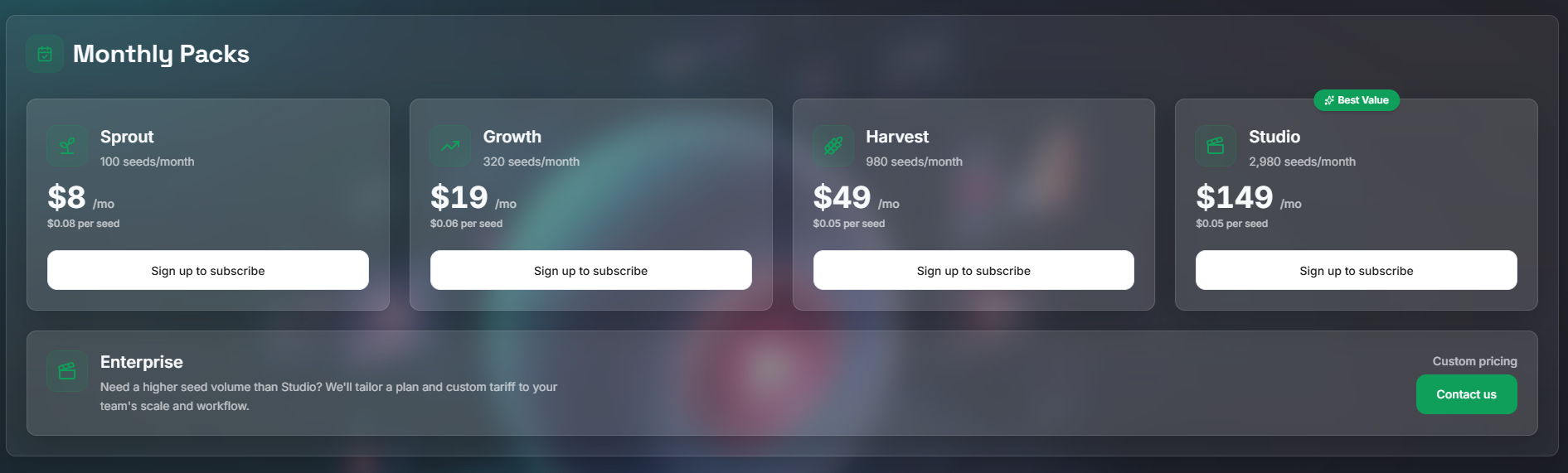
VidSeeds.ai uses a Seeds-based credit system. Seeds are consumed when you review a video and prepare its platform versions.
- Free Tier: 50 Seeds ($0), roughly 3–4 full video reviews with all features unlocked
- Paid Plans: Start at $8/month and scale to $19, $49, and $149/month depending on video volume and team features
- Money-Back Guarantee: 14 days for any paid plan
- Full plan details: https://vidseeds.ai/seeds/
The free tier is strategically generous. You can review 3–4 real videos from your own channel and prepare their platform cuts before spending money. Most testing frameworks for SaaS tools don't allow this. VidSeeds.ai does, which suggests confidence in the product's actual value.
Who Benefits Most From VidSeeds.ai
Solo Content Creators
The value is in removing blind spots. What normally takes a frustrated re-watch and a guess at "is this good?" becomes a 10-minute review task. At 1–2 videos per week, that's hours of reclaimed time and fewer flopped uploads monthly.
That time compounds. Six hours monthly becomes 72 hours yearly. At your hourly rate, that's meaningful cost savings.
Creator Teams and Marketing Departments
VidSeeds.ai enforces a repeatable workflow: upload, review, fix, prepare versions, approve, publish. Everyone follows the same process. Pre-publish quality becomes consistent rather than dependent on whoever's uploading that week.
For teams managing multiple channels, this workflow scales dramatically better than individual review.
Agencies Managing Client Channels
The review-before-publish model is built for client workflows. You can prepare complete, platform-ready versions of client videos, get client approval on the notes and cuts, and publish everything simultaneously across platforms. The approval loop happens before publication, not during the panic of a live video with zero views.
International Creators
The 85-language localization is practically invaluable if you're reaching audiences in multiple languages. Manually captioning and re-versioning across languages while preserving tone and meaning is a hours-per-video task. Having it built into the workflow saves the largest time investment for international creators.
Educational Content Creators
The retention and pacing review specifically helps educational content. Notes that reflect actual topic transitions and attention drops become more useful than arbitrary chapter breaks. Fixing the weak spots before publish helps viewers stay to the end.
What VidSeeds.ai Deliberately Doesn't Do
The platform is explicit about its lane:
- Not a video generator: No AI video creation, no synthetic footage, no deepfakes
- Not an editor: No timeline, no effects, no color correction. It tells you what to trim, you trim it
- Not a performance predictor: It doesn't forecast how many views you'll get or which thumbnail will perform best
- Not an auto-publisher: Every decision requires your explicit approval
- Not a replacement for keyword research tools: It doesn't tell you what people are searching for; it helps you ship what you've already created, better
This specificity is a strength. The platform does one job well rather than doing many jobs poorly.
The Real Economics: When Review Matters More Than Guesswork
Most creators obsess over algorithmic optimization (tags, keywords, upload timing) while treating pre-publish review like an afterthought. This is backwards.
The algorithm determines reach among viewers already searching YouTube. But the hook, the pacing, the title/thumbnail fit, and the platform cut determine whether the people who see it actually watch, stay, and follow.
A perfectly optimized algorithm-view might reach 10,000 people on YouTube. A soft hook means only 20% watch past 30 seconds. A mismatched thumbnail means only 30% click through on Twitter/X. A horizontal file on TikTok means only 10% watch the clip on Reels.
Better pre-publish review often means:
- Higher watch-through rates (because the hook delivered)
- Better click-through (because the title and thumbnail matched)
- More repurposed views (because each platform got the right cut)
- Stronger channel growth (because fewer videos flop)
VidSeeds.ai's value is in making review fast enough that it becomes a standard part of your workflow, not an optional extra you skip when time runs short.
Limitations and Realistic Expectations
Language Bias: The review works best with English-language content. Non-English videos are supported but may generate less precise notes.
Genre Limitations: Highly specialized content (niche technical tutorials, experimental art) may receive more generic notes because the analysis pipeline has less signal to work with.
Manual Refinement Required: The review is a starting point, not a finished product. Solo creators with a strong voice will want to act on the notes that fit and override the ones that don't.
Learning Curve: The first few videos might feel awkward as you learn which notes to trust and which to override.
Comparison: VidSeeds.ai vs. TubeBuddy/VidIQ
| Aspect | TubeBuddy/VidIQ | VidSeeds.ai |
|---|---|---|
| Primary Function | Keyword research + analytics | Pre-upload video review + version prep |
| Starting Point | Search trends + competitor analysis | Your finished video |
| Output | Keyword suggestions + performance metrics | What to fix + approved platform versions |
| Timing | Post-upload (reactive) | Pre-upload (proactive) |
| Use Case | Finding opportunities before creating | Fixing and shipping content after creating |
| Best For | Long-term channel strategy | Individual video launch quality |
Both tools serve different workflows. VidSeeds.ai isn't a replacement for keyword research; it's a replacement for the blind publish and the manual re-cut you do for every video.
The Verdict: When to Use VidSeeds.ai
Use it if:
- You publish 2+ videos weekly and worry some underperform for a reason you can't name
- You're publishing on 3+ platforms and hate re-cutting for each
- You have international audiences and want localized versions
- You want a real read on your hook, pacing, and title/thumbnail fit
- You're managing a team or client videos and need consistent review workflows
Skip it if:
- You publish less than 1 video monthly (the time savings don't compound)
- You're a keyword-first creator who plans content around search trends
- You have a highly specific voice and find AI notes limiting
- You prefer manual control over every pre-publish decision
Stop shipping blind. VidSeeds.ai watches your finished YouTube video, tells you what to fix before you publish, then prepares approved versions for Shorts, TikTok, Reels, and other platforms. You review the notes, approve the cuts, and nothing goes live without your eyes on it.
👉 Start with 50 free Seeds at VidSeeds.ai. No credit card required. Try 3–4 real videos to see the workflow.
Tags
# Review# VidSeeds.ai# YouTube review tool# pre-upload video review# fix video before publish# video repurposing# Shorts TikTok Reels# YouTube SEO# pre-upload video check# pre-publish video checklist# creator pre-publish review# multi-platform version prep# video publishing platform# video pacing review# video hook analysis# video retention review# thumbnail fit check# title and thumbnail review# video description review# YouTube pre-publish review# TikTok version prep# Instagram video SEO# Facebook version prep# LinkedIn video publishing# X video optimization# multi-language video versions# 85 language video localization# video caption translation# creator workflow tool# pre-upload video checklist tool# video SEO for creators# YouTube review tool# social media video SEO# video content optimization# creator video tools# freemium video tool# human reviewed video review# channel voice preservation# Seed-based pricing model# free video credits# publishing workflow for creators# video repurposing tool# cross-platform video publishing# creator-led business tools# marketing team video SEO# agency video optimization# podcast video SEO# educational video metadataShipThing Review - The Ultimate Next.js SaaS Boilerplate
AIChatOne Review - All-in-One AI Assistant Chrome Extension
Follow for new blogs
Subscribe to our blog
Subscribe to Newsletter
Subscribe to our newsletter to get the best products weekly.